

Android Status bar information
Icon of Android Status bar information
Display settings
In this menu, you can change various settings for the for the wallpaper, cube, brightness or backlight.
– From the Home screen, tap (Apps) ➔
(Settings) ➔ Display. For more information, refer to “Display Settings” on page 280.
Status Bar
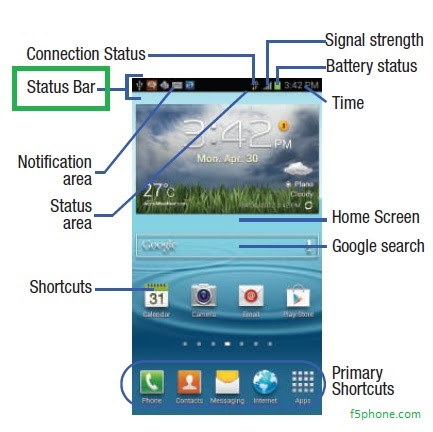
The Status Bar shows information about the connection status, signal strength, phone battery level, and time, and displays notifications about incoming messages, calls and other actions.
This list identifies the icons you see on your phone’s display screen:
Indicator Icons
This list identifies the symbols you’ll see on your device’s
display and Indicator area:
– From the Home screen, tap (Apps) ➔
(Settings) ➔ Display. For more information, refer to “Display Settings” on page 280.
Status Bar
The Status Bar shows information about the connection status, signal strength, phone battery level, and time, and displays notifications about incoming messages, calls and other actions.
This list identifies the icons you see on your phone’s display screen:
Indicator Icons
This list identifies the symbols you’ll see on your device’s
display and Indicator area:

Note: Some Notification icons can be hidden manually by
toggling the status of the Notification panel function.
Tags: Android Manual

 Previous Article
Đăng ký:
Đăng Nhận xét (Atom)
Share your views...
0 Respones to "Android Status bar information"
Đăng nhận xét